Yodel tracking now uses InPost: where to check your parcel
Still looking for Yodel tracking? Find the official InPost tracking route, what happened to old accounts and when to ask about a parcel that has stopped updating.
At a glance
- Former Yodel by InPost parcels can be tracked through the InPost website or app.
- The published brand-change date was 17 July 2026; this is a current help guide, not new breaking news.
- The current web tracking form asks for your parcel number.
- InPost advises an enquiry after 72 hours without an update after it received the parcel.
In this article (8)
For a former Yodel by InPost parcel in the UK, use the InPost website or InPost app to track it. InPost’s current tracking guidance directs customers to those channels. The official web form is inpost.co.uk/tracking; enter your parcel number there.
This guide explains the existing change and what to do with an old Yodel reference. It is not a report of a new rebrand today.
Why does a Yodel parcel now show InPost?
InPost announced on 26 June 2026 that Yodel by InPost would become InPost on 17 July 2026. Its announcement said tracking messages and delivery notifications would move to InPost. The company’s Yodel/InPost help page confirms the combined service covers home, locker and shop deliveries and collections.
An older retailer email may still be how you identify the order. Use it to find the parcel number, then check the current carrier information. A brand name in an order history is not enough to diagnose a lost parcel or establish where it is now.
How to track your parcel
- Find the carrier’s parcel number. Start with the retailer’s dispatch message or marketplace order details. Keep the order number separately so you do not confuse the two references.
- Open the official InPost tracking page. Its form asks for a parcel number. Copy it carefully, keeping the original message available if the result does not match your order.
- Read the latest event. Note what it says, when it occurred and whether the destination is your home, a locker or a shop. Save a screenshot before contacting support.
- Use the app for available delivery controls. InPost says the app provides updates and delivery preferences, including in-flight options. Only choose options offered for your particular shipment.
Sources: InPost tracking form and parcel-status help. Separating the references and saving the event history are our practical recommendations.
What happened to my Yodel web account?
The June announcement said Yodel by InPost web accounts would no longer be available from 17 July 2026. It instructed existing users to download the InPost app and sign in using the same phone number linked to the old account to bring across saved preferences. Follow the links in the official migration announcement if you need those instructions.
Keep account access separate from tracking a particular parcel. If you cannot sign in, retain the dispatch reference and try the official web tracking form while you resolve access. Do not publish your phone number, full address or collection code in a public support comment.
Which problem are you trying to solve?
| What you see | Useful next action |
|---|---|
| An old Yodel name in your order email | Use the parcel number to check the official InPost route. |
| No matching result | Recheck the copied reference and ask the sender to confirm the carrier and parcel number. |
| A home delivery with change options | Review the options available in the InPost app; do not assume every parcel can be redirected. |
| A parcel awaiting collection | Read the actual collection location and instructions before travelling. |
| A stale tracking event | Record the last event and check the support guidance below. |
This table is an editorial troubleshooting sequence. It does not predict the location or delivery date of an individual parcel.
When should you ask about tracking that has stopped?
InPost’s tracking-page FAQ says to contact Customer Care if there has been no tracking update for 72 hours after InPost received the parcel. It also warns that international parcels can take up to a week to reach its network. Do not count from the time an order was placed and assume that means the carrier has had the parcel that long.
If you need help, have the parcel number, last event, dispatch date and a short description of the problem ready. Ask a specific question, such as whether the parcel has been received into the network, rather than reporting only that “Yodel has disappeared”.
What should an online seller change?
Our recommendation is to review dispatch templates, saved help links and customer-service replies for references to the old account route. Keep historical carrier information in your order records, but point customers to the current official instructions. Test your links before editing a large batch of templates.
For related coverage, use our InPost hub and Yodel hub. Browse courier tracking guides for other operators. If the question is about wider support standards, read our report on Ofcom’s parcel-service findings.
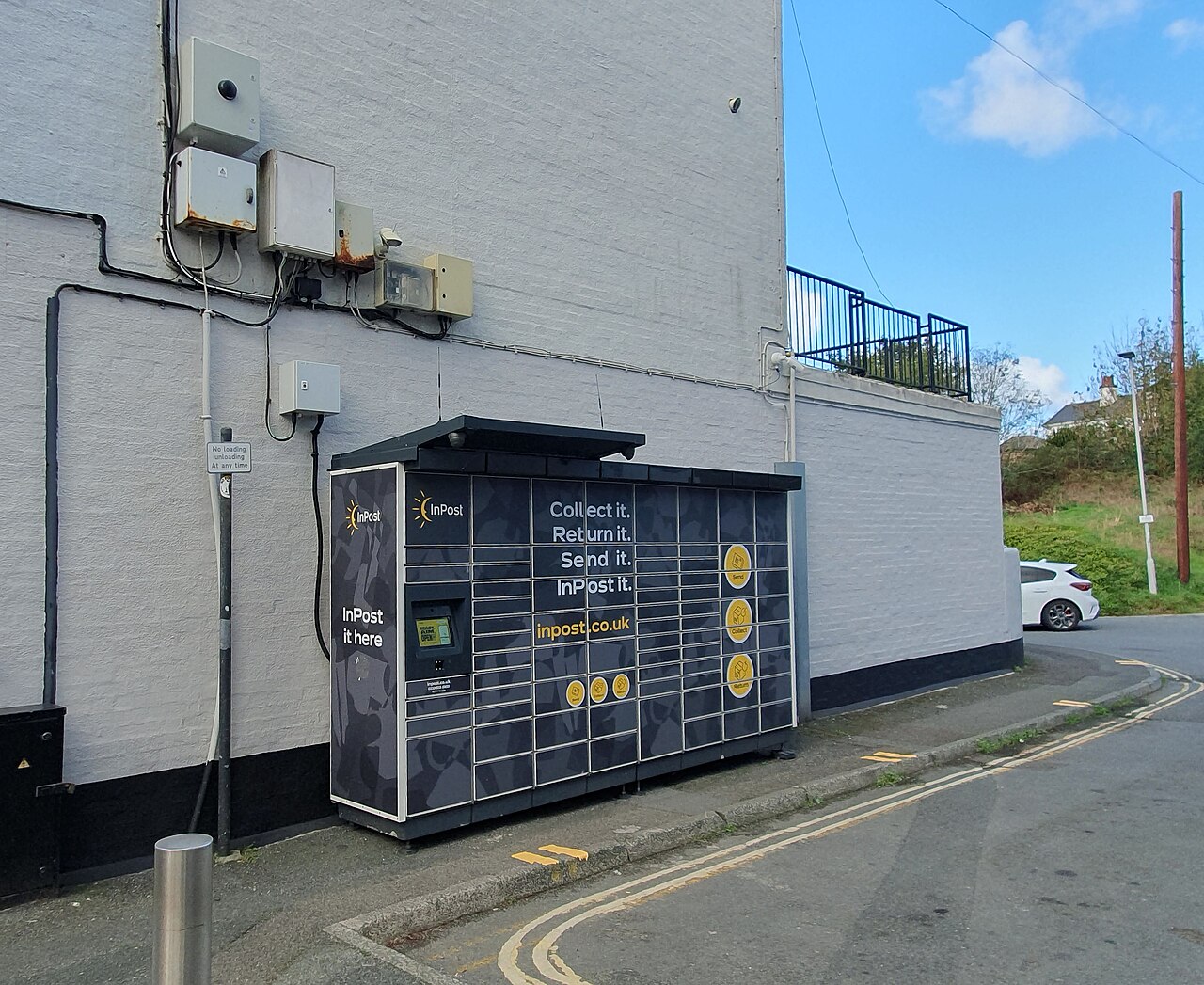
Checked on 2 November 2026. Illustrative photograph: Mutney, InPost parcel locker, Plymstock Broadway, Plymouth, Devon — October 2026, via Wikimedia Commons, CC BY 4.0. Wikimedia’s resized 1280px version; the site may crop it for display. It shows a locker, not a specific customer’s delivery or the July rebrand.

Sources
Use the current official tracking route and the actual parcel event history; an old Yodel name in an email does not tell you where the parcel is.
Related guides
 UK
Ofcom considers tougher parcel rules as customer satisfaction falls
Ofcom is considering stronger parcel protections following its latest customer survey. Here is what the findin…
2 Nov 2026
 UK
Evri tracking not updating: who to contact and what to check
Check the last tracking event, confirm who booked the label and contact the right organisation. A practical gu…
31 Oct 2026
 UK
Royal Mail peak surcharge starts 2 November: what UK sellers should check
Royal Mail’s business peak surcharge runs from 2 November 2026 to 10 January 2027. Check the exact service and…
1 Nov 2026
 UK
Royal Mail parcel checklist: pack, weigh and measure before booking
Prepare accurate parcel details before buying postage: pack securely, weigh the finished box and measure its o…
30 Oct 2026
Parcel news that matters.
Courier changes, delivery disruption, price updates and practical shipping guidance.
No spam. Unsubscribe anytime.